

Global Payouts
Move revenue from your Bachs balance to your own bank accounts and mobile money wallets across more countries. Global Payouts is available to all Bachs users.Bank payouts support NGN, GHS, KES, TZS, UGX, GBP, USD, CAD and EUR. Mobile money payouts are available in Ghana, Kenya and Tanzania, alongside supported USDT and USDC wallet payouts.The method depends on your destination:- Local bank transfers in Nigeria, Ghana, Kenya, Tanzania and Uganda.
- Faster Payments in the UK, ACH, Wire or RTP in the US, EFT or Interac in Canada, and SEPA in supported Eurozone countries.
- Mobile money in GHS, KES and TZS, and stablecoin payouts on supported networks.
We warn you when a webhook endpoint keeps failing
If every delivery to one of your webhook endpoints fails for 24 hours, we now email your account owner and admins. The email names the endpoint, says when it started failing, and gives the date we will turn it off.If it is still failing after 72 hours, and at least 48 hours after that email, we turn the endpoint off and email you again. One successful delivery resets the count. Before this, nothing told you an endpoint was failing unless you watched the Events tab.To turn an endpoint back on, open it under Webhooks in the developer portal and click Enable endpoint, or send{ "enabled": true } to the API. Events from while it was off are not sent on their own, so resend the ones you need. You can also turn an endpoint off yourself with the new Enabled switch.When an endpoint keeps failing · RetriesFixes and improvements
- NGN virtual account deposits now cost 1% of the amount, down from 1.5%. The cap stays at NGN 300. Fees
- We now require permission to manage webhooks before a team member can add, edit, enable, disable or delete an endpoint, see or rotate its signing secret, or resend events. The Owner, Super Admin and Developer roles have it by default. Before this, any team member could change your webhooks.
Virtual accounts
Collect NGN bank transfers through a fixed account number for your business or a connected account. The number does not expire, and each deposit becomes a payment on the account that owns it.For repeat payments, customers can send money straight from their banking app without starting another checkout. Share the account number and bank name, then track incoming deposits through your integration. If you need a transfer tied to a specific order, continue to use a bank-transfer checkout.Request thevirtual_accounts capability and complete the account’s returned requirements, including the representative’s BVN. Once the capability is active, retrieve or create the number through the API. Each account can hold one virtual account per currency; NGN is the only currency available today.Your integration receives collection.succeeded when a deposit succeeds. Sender details, when supplied by the bank, help you reconcile transfers against your own records.Set up a virtual accountLet buyers check out without you knowing who they are first
You no longer have to attach a customer when you create a checkout. Leavecustomer out and the hosted page asks the buyer for their email and name before they pay.By default they do not join your customer directory, so one-time buyers you will never bill again do not clutter it. You still get their email and name, and their purchases still group together in your dashboard, so you can find them when they write in about a refund.Pass customer_creation: "always" when you do want the record. The buyer is matched by email, so someone you already hold lands on their existing record rather than a second one.customer_details carries their email and name on the checkout object and on the checkout.completed webhook, whether or not a record was created. That is new for payment links with a fixed price, which previously gave you no identity at all on completion.A subscription checkout is the exception: it always creates a customer, because recurring billing needs somewhere durable to keep the card on file for renewal.Whether a guest becomes a customerChoose the currencies behind each payment method
You can now decide not only which payment methods a checkout offers, but which currencies each of those methods is offered in. Accept cards in USD without accepting them in NGN, or offer bank transfer in every currency it supports while keeping cards to one.Overlay checkout
Your customers can now pay without leaving your site. Dropbachs.js on your page and any checkout session opens in a modal overlay: the hosted checkout, with every payment method and currency, on top of your own page.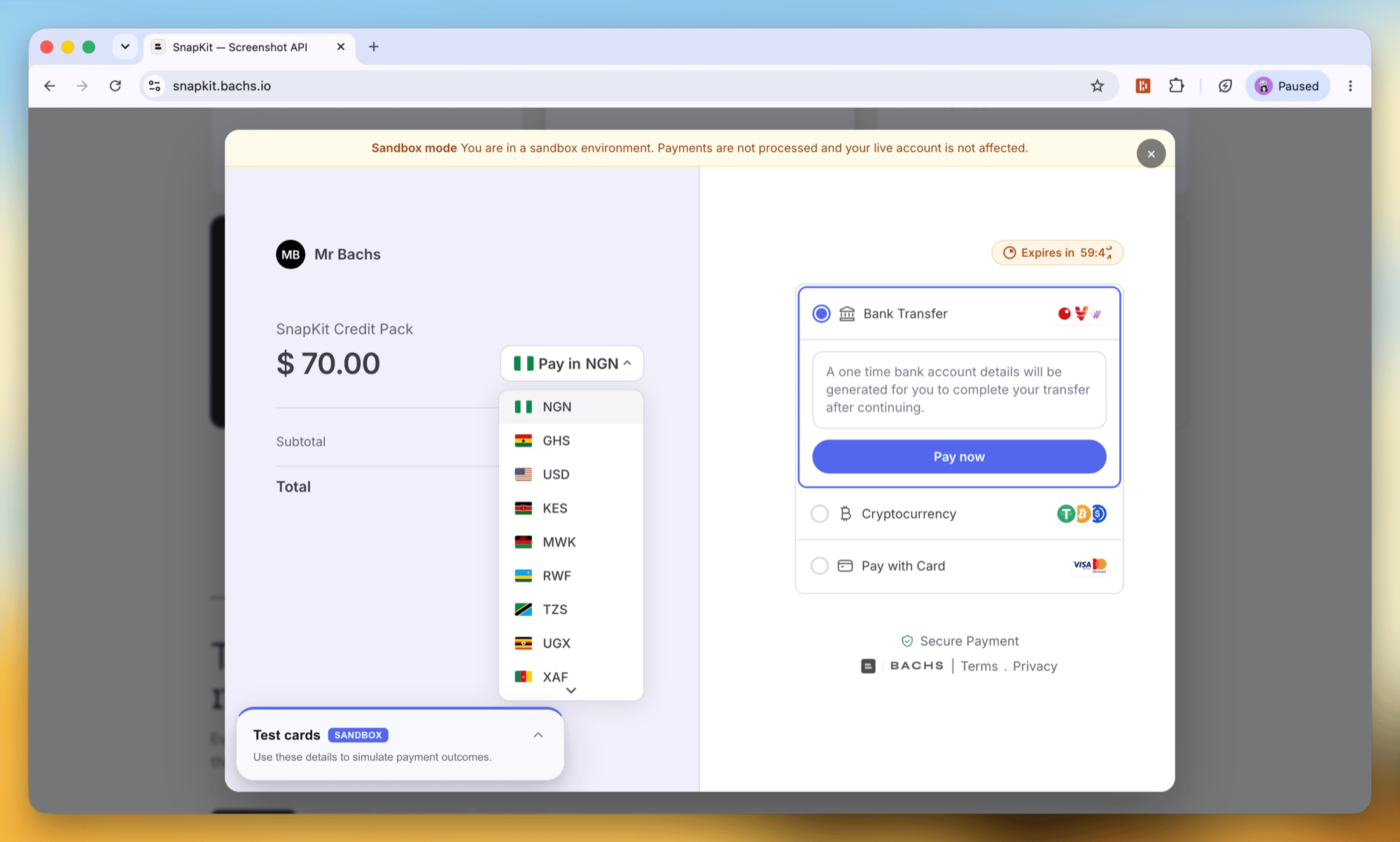
checkout.ready, checkout.completed, checkout.failed, and more) so your page can react in real time, and it ships as a plain script tag or the @bachs/js npm package with full TypeScript types. There is no test/live switch to configure: the session URL carries its environment, so going live changes zero client code.Before this, the only way to take a payment was redirecting the customer to the hosted page.Add an overlay checkoutA demo you can click
snapkit.bachs.io is a fictional screenshot API whose pricing page runs entirely on Bachs, in the sandbox. One-time purchases, subscriptions, a 14-day free trial, quantity packs, and pay-what-you-want, each one a real checkout you can complete with a test card. A toggle opens every purchase in the overlay or as the hosted page, and you can check out with your own email to get the receipts.Tour the demoSubscriptions
You can now sell recurring products and manage the subscriptions they create, end to end.Give any product abilling_cycle and it becomes recurring. When a customer completes a checkout for that product, Bachs saves their card, bills the first cycle, and creates a subscription that renews automatically. Add a trial_period to defer the first charge.Each subscription exposes its full lifecycle: its status (trialing, active, past_due, unpaid, canceled), the current billing period, the next charge date, and the line items being billed. You can:- Change the plan by moving a subscription to a different product.
- Move or end a trial by setting
trial_end. - Swap the payment method and retry collection immediately if the subscription is past due.
- Cancel immediately, or at the end of the current period with
cancel_at_period_end.
Payments: one record for every sale
Every payment a customer makes is now a single payment object, whether it is a one-time purchase or a subscription renewal. Each payment carries abilling_reason (purchase, subscription_create, subscription_cycle, subscription_update) so you always know why it was charged, plus the customer, line items, fees, refunds, and (for subscriptions) the invoice it collected.Payments APIControl your checkout redirects
Checkout sessions now accept asuccess_url for where the customer lands after paying, and honor cancel_url when they abandon. You can also set expires_in_minutes (1 to 1440) to control how long a session stays open.Checkout sessionsWebhooks got a real home this week: one clear section in the docs, and an API to manage endpoints without leaving your code.The response includes the signing secret once, on creation, so you can wire up signature verification straight away. You can also read delivery metrics per endpoint and resend a past event to debug an integration.Before this, setting up a webhook meant clicking through the dashboard. Now you can script it, provision endpoints per environment, and manage them the same way you manage the rest of your integration. It needs an API key with the
Manage webhook endpoints from the API
You can now create and manage webhook endpoints with an API key, not just from the dashboard. Register a URL, choose the events it should receive, rotate its signing secret, and inspect deliveries, all programmatically.webhooks:read / webhooks:write scopes.Webhook endpoint API · Setting up webhooks