

status, and the webhooks are how you learn it.
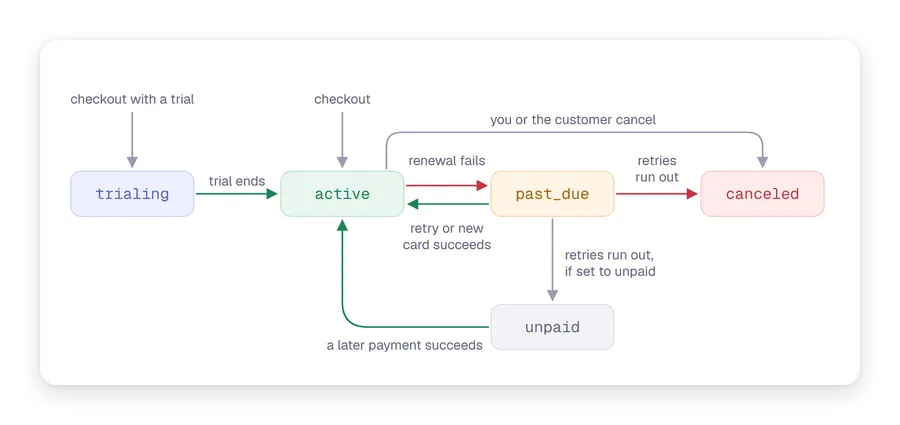
Stage by stage
1
The customer subscribes
A subscription starts when a customer completes a checkout for a product with a
billing_cycle. There is no call to create one directly. You receive customer.subscription.created with status: "active", or "trialing" if the product has a free trial.Your app: save the subscription and its customer_id, and give access.2
The trial ends
Bachs charges the card saved at checkout for the first cycle. You receive
invoice.paid and the subscription becomes active, or invoice.payment_failed and recovery starts. Adding, extending or ending a trial sends customer.subscription.updated.Your app: nothing changes for the customer if the charge succeeds.3
It renews
At the end of each period, Bachs moves the subscription to the next cycle, opens an invoice and charges the saved card. You receive
invoice.created when the invoice opens, then invoice.paid when it is collected.Your app: optionally record the payment or send your own receipt. Access carries on.4
A renewal fails
The subscription moves to
past_due and Bachs retries the charge three times: 1 day after the failure, 3 days after that, and 5 days after that. Each failed attempt sends invoice.payment_failed, and Bachs emails the customer a link to a hosted page where they can update their card. If a retry or a new card succeeds, the invoice is paid, the subscription is active again, and you receive invoice.paid.Your app: optionally ask the customer to update their card. Whether they keep access while retries run is your choice.5
Recovery runs out
If the third retry fails, your subscription settings decide what happens. By default the subscription is
canceled with the reason payment_failed, and you receive customer.subscription.deleted. If you chose to keep unpaid subscriptions, it moves to unpaid instead, you receive customer.subscription.updated, and a later payment can still bring it back. See Recover failed payments.Your app: remove access.6
It changes
A plan change, a new seat count, a trial change, a new card or a cancellation scheduled for the period end each send
customer.subscription.updated. See Change or cancel a subscription and How proration works.Your app: save the new state. Access follows status.7
It's canceled
Canceled at the period end, the subscription keeps working until
current_period_end with cancel_at_period_end: true, then becomes canceled. Canceled immediately, it is canceled at once. Either way, you receive customer.subscription.deleted when it is canceled. That status is final: a later payment can’t revive it, and the customer starts a new subscription.Your app: remove access when you receive customer.subscription.deleted, not when the cancellation is scheduled.Access by status
Handling the events well
- Decide access from the webhook, never from the checkout redirect. The customer can close the tab before your success page loads, and anyone can open the URL.
- Save the status and read it from your own database. Each
customer.subscription.updatedcarries the full subscription, so save it whole rather than applying a diff. - Deduplicate by event ID. Each event’s
idis unique; a retried delivery repeats it. See Set up webhooks. - Verify the signature of every delivery before you act on it. See Verify your webhooks.
Next steps
- Sell SaaS subscriptions: the whole loop, built end to end in the sandbox.
- Recover failed payments: the retry schedule and the recovery email in detail.
- Set up the customer portal: let customers change plans, cards and cancellations themselves.